
Databricks Metric Views
In this article, we will take a quick look at Databricks metric views - why we need them, how they work, and what problems they solve. Let's start from a simple dataset and build up from there.
The full source code for the demo is available in this GitHub Gist.
We have three tables: regions, customers, and orders. Three regions (EMEA, AMER, APAC), eight customers spread across them, and ten orders. Nothing fancy — just enough data to see the problem:
CREATE SCHEMA IF NOT EXISTS demo.metric_views;

USE demo.metric_views;

-- Regions
CREATE OR REPLACE TABLE regions (region_id INT, region_name STRING);

INSERT INTO regions
  VALUES (1, 'EMEA'), (2, 'AMER'), (3, 'APAC');

-- Customers
CREATE OR REPLACE TABLE customers (customer_id INT, customer_name STRING, region_id INT);

INSERT INTO customers
  VALUES
    (101, 'Acme Corp', 1), -- EMEA
    (102, 'Globex Ltd', 1), -- EMEA
    (103, 'Initech Inc', 2), -- AMER
    (104, 'Umbrella Co', 2), -- AMER
    (105, 'Wonka Industries', 2), -- AMER
    (106, 'Stark Enterprises', 3), -- APAC
    (107, 'Wayne Corp', 3), -- APAC
    (108, 'Oscorp', 3);

-- APAC
-- Orders
CREATE OR REPLACE TABLE orders (
  order_id INT,
  customer_id INT,
  order_date DATE,
  amount DECIMAL(10, 2)
);

INSERT INTO orders
  VALUES
    (1, 101, '2025-01-15', 1000.00), -- Acme (EMEA)
    (2, 101, '2025-02-20', 1500.00), -- Acme (EMEA) — repeat customer
    (3, 102, '2025-01-10', 800.00), -- Globex (EMEA)
    (4, 103, '2025-03-05', 2000.00), -- Initech (AMER)
    (5, 104, '2025-03-12', 500.00), -- Umbrella (AMER)
    (6, 104, '2025-04-01', 700.00), -- Umbrella (AMER) — repeat customer
    (7, 105, '2025-02-28', 1200.00), -- Wonka (AMER)
    (8, 106, '2025-01-20', 3000.00), -- Stark (APAC)
    (9, 107, '2025-04-15', 900.00), -- Wayne (APAC)
    (10, 108, '2025-03-22', 1100.00); -- Oscorp (APAC)
SELECT
  'regions' AS tbl,
  COUNT(*) AS cnt
FROM
  regions
UNION ALL
SELECT
  'customers' AS tbl,
  COUNT(*) AS cnt
FROM
  customers
UNION ALL
SELECT
  'orders' AS tbl,
  COUNT(*) AS cnt
FROM
  orders;
| tbl | cnt |
|---|---|
| regions | 3 |
| customers | 8 |
| orders | 10 |
We also create a denormalized view that joins everything together. This will be our source for all the queries that follow:
CREATE OR REPLACE VIEW orders_denorm AS
SELECT
  o.order_id,
  o.customer_id,
  c.customer_name,
  r.region_id,
  r.region_name,
  o.order_date,
  o.amount
FROM
  orders o
    JOIN customers c
      ON o.customer_id = c.customer_id
    JOIN regions r
      ON c.region_id = r.region_id;
SELECT
  *
FROM
  orders_denorm
ORDER BY
  order_id;
| order_id | customer_id | customer_name | region_id | region_name | order_date | amount |
|---|---|---|---|---|---|---|
| 1 | 101 | Acme Corp | 1 | EMEA | 2025-01-15 | 1000.00 |
| 2 | 101 | Acme Corp | 1 | EMEA | 2025-02-20 | 1500.00 |
| 3 | 102 | Globex Ltd | 1 | EMEA | 2025-01-10 | 800.00 |
| 4 | 103 | Initech Inc | 2 | AMER | 2025-03-05 | 2000.00 |
| 5 | 104 | Umbrella Co | 2 | AMER | 2025-03-12 | 500.00 |
| 6 | 104 | Umbrella Co | 2 | AMER | 2025-04-01 | 700.00 |
| 7 | 105 | Wonka Industries | 2 | AMER | 2025-02-28 | 1200.00 |
| 8 | 106 | Stark Enterprises | 3 | APAC | 2025-01-20 | 3000.00 |
| 9 | 107 | Wayne Corp | 3 | APAC | 2025-04-15 | 900.00 |
| 10 | 108 | Oscorp | 3 | APAC | 2025-03-22 | 1100.00 |
Now let's build a simple KPI view — total revenue, distinct customers, and revenue per customer, grouped by region:
CREATE OR REPLACE VIEW region_kpis AS
SELECT
  r.region_name,
  SUM(o.amount) AS total_revenue,
  COUNT(DISTINCT o.customer_id) AS distinct_customers,
  SUM(o.amount) / COUNT(DISTINCT o.customer_id) AS revenue_per_customer
FROM
  orders o
    JOIN customers c
      ON o.customer_id = c.customer_id
    JOIN regions r
      ON c.region_id = r.region_id
GROUP BY
  r.region_name;
-- This view looks great per region:
SELECT
  *
FROM
  region_kpis
ORDER BY
  region_name;
| region_name | total_revenue | distinct_customers | revenue_per_customer |
|---|---|---|---|
| AMER | 4400.00 | 3 | 1466.67 |
| APAC | 5000.00 | 3 | 1666.67 |
| EMEA | 3300.00 | 2 | 1650.00 |
Per region, this looks great. But what happens when someone wraps this view in another query to get a grand total?
-- THE PROBLEM — re-aggregating the view gives WRONG results
-- Someone wraps the view in another query to get a grand total...
SELECT
  SUM(total_revenue) AS grand_total_revenue,
  SUM(distinct_customers) AS grand_total_customers, -- WRONG: 3+3+2=8, happens to be correct here but only by luck
  SUM(revenue_per_customer) AS grand_revenue_per_customer -- WRONG!
FROM
  region_kpis;
-- WHY: Summing per-group ratios ≠ the global ratio.
--       Groups have different denominators (2, 3, 3 customers),
--       so the ratios aren't comparable units you can add up.
--       The ratio must be recomputed from the raw numerator and denominator.
--       (a1 + a2 + a3) / (b1 + b2 + b3) != (a1 / b1 + a2 / b2 + a3 / b3) ¯\_(ツ)_/
| grand_total_revenue | grand_total_customers | grand_revenue_per_customer |
|---|---|---|
| 12700.00 | 8 | 4783.33 |
The revenue per customer number is wrong. We're summing three ratios with different denominators (2, 3, and 3 customers). That's not how math works.
And no, averaging doesn't fix it either:
-- You can't average averages!
SELECT
  AVG(revenue_per_customer) AS avg_revenue_per_customer -- STILL WRONG
FROM
  region_kpis;
-- Result: (1466.67 + 1666.67 + 1650.00) / 3 = 1594.44
-- Correct: 1587.50
-- Close-ish, but wrong. And the error grows with uneven group sizes.
-- You cannot safely re-aggregate ratio measures.
-- The measure must be recomputed from raw data at every level of aggregation.
| avg_revenue_per_customer |
|---|
| 1594.44 |
Close, but wrong. And the error grows with uneven group sizes. You can’t average averages. The takeaway here is that you cannot safely re-aggregate ratio measures. The metric must be recomputed from raw data at every level of aggregation.
One traditional approach is GROUP BY CUBE, which computes every possible combination of dimensions:
-- With one dimension it's fine.
SELECT
  COALESCE(region_name, 'All Regions') AS region_name,
  SUM(amount) AS total_revenue,
  COUNT(DISTINCT customer_id) AS distinct_customers,
  SUM(amount) / COUNT(DISTINCT customer_id) AS revenue_per_customer,
  region_name AS _sort
FROM
  orders_denorm
GROUP BY
  CUBE (region_name)
ORDER BY
  _sort NULLS LAST;
| region_name | total_revenue | distinct_customers | revenue_per_customer | _sort |
|---|---|---|---|---|
| AMER | 4400.00 | 3 | 1466.67 | AMER |
| APAC | 5000.00 | 3 | 1666.67 | APAC |
| EMEA | 3300.00 | 2 | 1650.00 | EMEA |
| All Regions | 12700.00 | 8 | 1587.50 | null |
With one dimension, this is fine. But with three dimensions,
CUBE produces 2^3 = 8 grouping levels.
With 10 dimensions, you are already at 1024 grouping levels, and with more dimensions it grows from there.
That can quickly turn into millions of rows, most of which nobody ever queries. It does not scale:
-- CUBE with 3 dimensions produces 2^3 = 8 grouping levels:
-- every possible subset of {region, customer, date}.
-- With 10 source rows this is manageable, but in production
-- with 10+ dimensions you'd get 1024+ grouping levels and
-- millions of rows — most of which nobody ever queries.
SELECT
  COALESCE(region_name, 'All Regions') AS region_name,
  COALESCE(customer_name, 'All Customers') AS customer_name,
  COALESCE(CAST(order_date AS STRING), 'All Dates') AS order_date,
  SUM(amount) AS total_revenue,
  COUNT(DISTINCT customer_id) AS distinct_customers,
  SUM(amount) / COUNT(DISTINCT customer_id) AS revenue_per_customer
FROM
  orders_denorm
GROUP BY
  CUBE (region_name, customer_name, order_date)
ORDER BY
  region_name,
  customer_name,
  order_date
The query above returns 60 rows.
This is where metric views come into play. You define your dimensions and measures once, and the engine recomputes everything correctly at query time, no matter how you slice:
CREATE OR REPLACE VIEW order_metrics_view WITH METRICS LANGUAGE YAML AS
$$
version: "1.1"
source: demo.metric_views.orders_denorm
dimensions:
  - name: region_name
    expr: region_name
    display_name: Region
  - name: customer_name
    expr: customer_name
    display_name: Customer
  - name: order_date
    expr: order_date
    display_name: Order Date
measures:
  - name: total_revenue
    expr: SUM(amount)
    display_name: Total Revenue
  - name: customer_count
    expr: COUNT(DISTINCT customer_id)
    display_name: Distinct Customers
  - name: order_count
    expr: COUNT(order_id)
    display_name: Order Count
  - name: revenue_per_customer
    expr: SUM(amount) / COUNT(DISTINCT customer_id)
    display_name: Revenue per Customer
$$;
The display_name fields are part of Databricks semantic metadata for metric views.
Now query it by region. Measures must be wrapped in the
MEASURE function so the engine can evaluate them at the query's grouping level:
-- Query by region — same results as the regular view
-- Measures MUST be wrapped in MEASURE()
SELECT
  region_name,
  MEASURE(total_revenue) AS total_revenue,
  MEASURE(customer_count) AS distinct_customers,
  MEASURE(revenue_per_customer) AS revenue_per_customer
FROM
  order_metrics_view
GROUP BY
  region_name
ORDER BY
  region_name;
-- Expected:
--   AMER:  4400 / 3 = 1466.67
--   APAC:  5000 / 3 = 1666.67
--   EMEA:  3300 / 2 = 1650.0
| region_name | total_revenue | distinct_customers | revenue_per_customer |
|---|---|---|---|
| AMER | 4400.00 | 3 | 1466.67 |
| APAC | 5000.00 | 3 | 1666.67 |
| EMEA | 3300.00 | 2 | 1650.00 |
For the grand total, we just omit the GROUP BY clause:
-- Grand total:
-- No GROUP BY -> the engine computes from ALL raw data
-- -----------------------------------------------------------------------------
SELECT
  MEASURE(total_revenue) AS total_revenue,
  MEASURE(customer_count) AS distinct_customers,
  MEASURE(revenue_per_customer) AS revenue_per_customer -- The ratio is recomputed, not summed!
FROM
  order_metrics_view;
-- Expected: 12700 / 8 = 1587.50  <- CORRECT
| total_revenue | distinct_customers | revenue_per_customer |
|---|---|---|
| 12700.00 | 8 | 1587.50 |
We can also group by a different dimension without rewriting the view:
-- Group by a different dimension — no view rewrite needed
SELECT
  customer_name,
  MEASURE(total_revenue) AS total_revenue,
  MEASURE(order_count) AS orders,
  MEASURE(revenue_per_customer) AS revenue_per_customer
FROM
  order_metrics_view
GROUP BY
  customer_name
ORDER BY
  total_revenue DESC;
-- Revenue per customer when grouped by customer is just their total revenue / 1,
-- because each group contains exactly one distinct customer
| customer_name | total_revenue | orders | revenue_per_customer |
|---|---|---|---|
| Stark Enterprises | 3000.00 | 1 | 3000.00 |
| Acme Corp | 2500.00 | 2 | 2500.00 |
| Initech Inc | 2000.00 | 1 | 2000.00 |
| Wonka Industries | 1200.00 | 1 | 1200.00 |
| Umbrella Co | 1200.00 | 2 | 1200.00 |
| Oscorp | 1100.00 | 1 | 1100.00 |
| Wayne Corp | 900.00 | 1 | 900.00 |
| Globex Ltd | 800.00 | 1 | 800.00 |
And we can filter by specific regions, too:
SELECT
  region_name,
  MEASURE(total_revenue) AS total_revenue,
  MEASURE(revenue_per_customer) AS revenue_per_customer
FROM
  order_metrics_view
WHERE -- Filtered query — also correct automatically
  region_name IN ('EMEA', 'AMER')
GROUP BY
  region_name
| region_name | total_revenue | revenue_per_customer |
|---|---|---|
| EMEA | 3300.00 | 1650.00 |
| AMER | 4400.00 | 1466.67 |
And here is the grand total for those two regions:
-- Grand total for just EMEA + AMER:
SELECT
  MEASURE(total_revenue) AS total_revenue,
  MEASURE(customer_count) AS distinct_customers,
  MEASURE(revenue_per_customer) AS revenue_per_customer
FROM
  order_metrics_view
WHERE
  region_name IN ('EMEA', 'AMER');
-- Expected: (3300 + 4400) / (2 + 3) = 7700 / 5 = 1540.00
-- MEASURE() tells the engine to recompute the expression at whatever grain the query defines.
-- You define the metric ONCE and slice it freely
| total_revenue | distinct_customers | revenue_per_customer |
|---|---|---|
| 7700.00 | 5 | 1540.00 |
Materialization
Aggregated Materialization
For dashboards that repeatedly hit the same slices, metric view materialization can speed things up. According to the docs, this feature is experimental and requires serverless compute plus Databricks Runtime 17.2 or above. There are two types: aggregated and unaggregated materialization:
-- Aggregated Materialization
-- Pre-compute specific dimension + measure combinations.
-- "these are my hot dashboard queries."
CREATE OR REPLACE VIEW order_metrics_mat_agg WITH METRICS LANGUAGE YAML AS
$$
version: "1.1"
source: demo.metric_views.orders_denorm
dimensions:
  - name: region_name
    expr: region_name
  - name: customer_name
    expr: customer_name
  - name: order_date
    expr: order_date
measures:
  - name: total_revenue
    expr: SUM(amount)
  - name: customer_count
    expr: COUNT(DISTINCT customer_id)
  - name: order_count
    expr: COUNT(order_id)
  - name: revenue_per_customer
    expr: SUM(amount) / COUNT(DISTINCT customer_id)
materialization:
  mode: "relaxed"
  schedule: "EVERY 1 HOUR"
  materialized_views:
    - name: mv_by_region
      type: aggregated
      dimensions:
        - region_name
      measures:
        - total_revenue
        - customer_count
        - revenue_per_customer
$$;
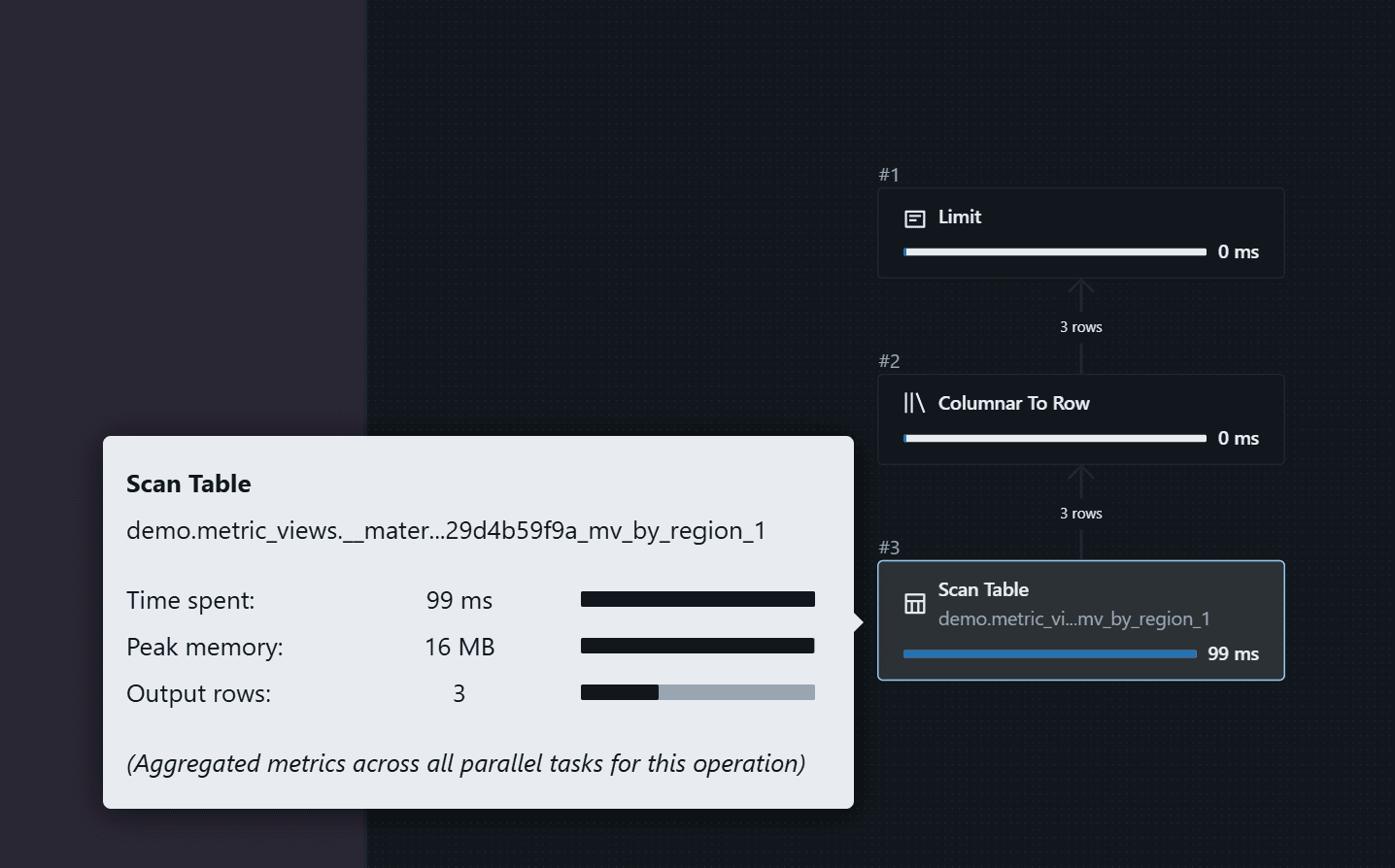
Let's try this query. Once the materialization is available, the optimizer can serve it from the materialized result:
-- this SHOULD hit the materialized view (fast path)
-- REFRESH MATERIALIZED VIEW order_metrics_mat_agg;
SELECT
  region_name,
  MEASURE(total_revenue),
  MEASURE(revenue_per_customer)
FROM
  order_metrics_mat_agg
GROUP BY
  region_name
In the plan, we can see the optimizer using the materialized path:
Now let's try another query.
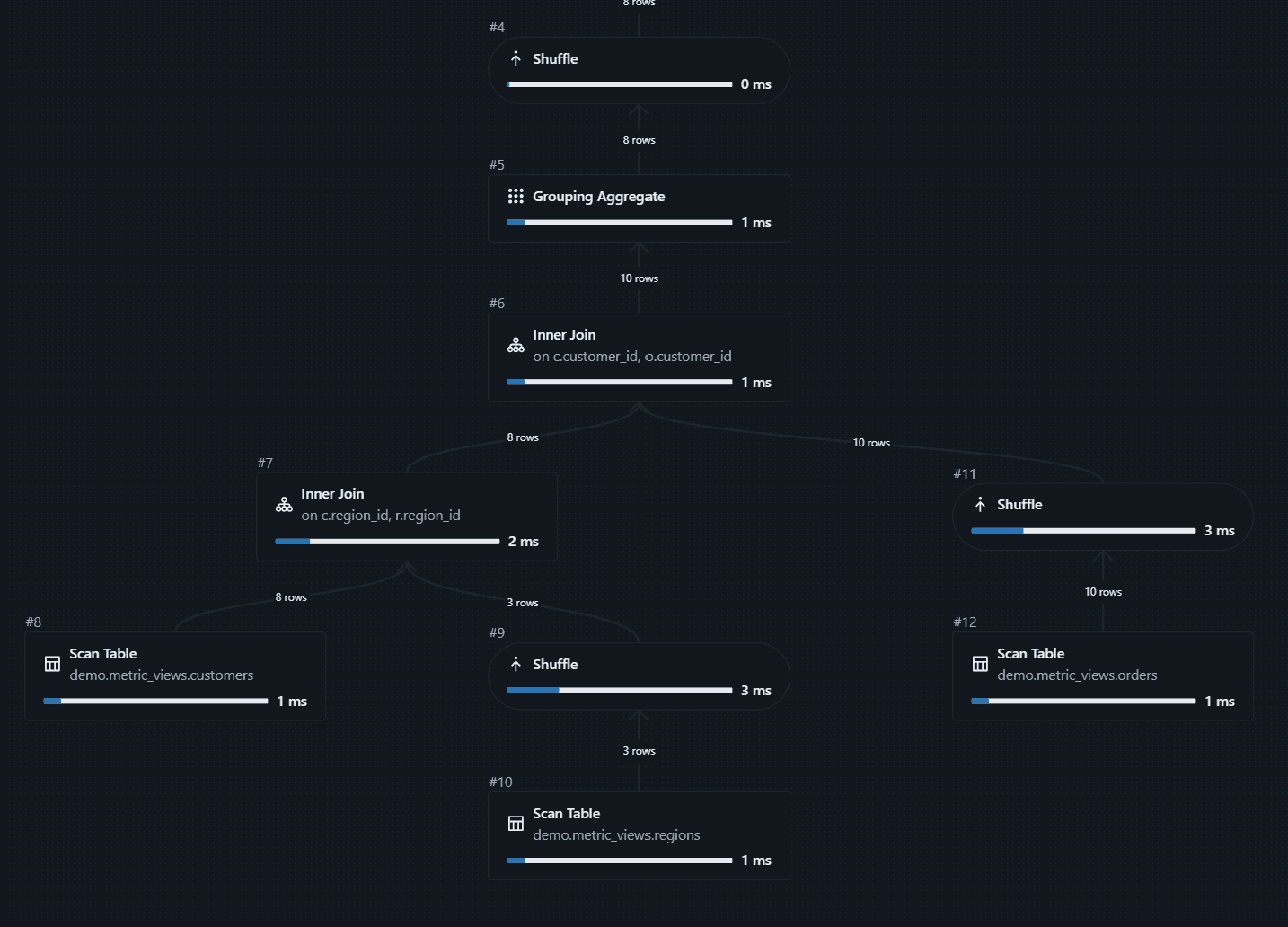
It falls back to the source data because the customer_name dimension is not materialized:
-- this falls back to source data (no materialization covers this combo)
-- REFRESH MATERIALIZED VIEW order_metrics_mat_agg;
SELECT
  customer_name,
  MEASURE(total_revenue)
FROM
  order_metrics_mat_agg
GROUP BY
  customer_name
This query falls back to the source data. The calculations are still correct; they are just not precomputed:
We can also add a separate materialization for customer_name:
CREATE OR REPLACE VIEW order_metrics_mat_agg WITH METRICS LANGUAGE YAML AS
$$
version: "1.1"
source: demo.metric_views.orders_denorm
dimensions:
  - name: region_name
    expr: region_name
  - name: customer_name
    expr: customer_name
  - name: order_date
    expr: order_date
measures:
  - name: total_revenue
    expr: SUM(amount)
  - name: customer_count
    expr: COUNT(DISTINCT customer_id)
  - name: order_count
    expr: COUNT(order_id)
  - name: revenue_per_customer
    expr: SUM(amount) / COUNT(DISTINCT customer_id)
materialization:
  mode: "relaxed"
  schedule: "EVERY 1 HOUR"
  materialized_views:
    - name: mv_by_region
      type: aggregated
      dimensions:
        - region_name
      measures:
        - total_revenue
        - customer_count
        - revenue_per_customer
    # Separate materialized view at customer grain.
    # Can't just add customer_name to mv_by_region — that changes
    # the grain to (region, customer), and ratio measures like
    # revenue_per_customer can't be safely re-aggregated from
    # a finer grain back to region-only. One grain = one MV.
    - name: mv_by_customer
      type: aggregated
      dimensions:
        - customer_name
      measures:
        - total_revenue
$$;
After the refresh completes, this query can use the new materialized result.
One caveat: right after you change the view, you may still see the old plan because the materialization pipeline runs asynchronously in the background and needs time to finish.
You can also trigger view materialization manually:
REFRESH MATERIALIZED VIEW order_metrics_mat_agg;
The more dimensions you materialize together, the more compute and storage the system needs, so use this feature selectively.
Unaggregated Materialization
Another materialization type is unaggregated. With this approach, we can pre-materialize the joined data model (fact plus dimensions flattened). It is very useful when joins are the expensive part, not the aggregation:
-- Unaggregated Materialization
-- Pre-materialize the joined data model (fact + dimensions flattened).
-- Useful when joins are the expensive part, not the aggregation.
CREATE OR REPLACE VIEW order_metrics_mat_unagg WITH METRICS LANGUAGE YAML AS
$$
version: "1.1"
source: demo.metric_views.orders_denorm
dimensions:
  - name: region_name
    expr: region_name
  - name: customer_name
    expr: customer_name
  - name: order_date
    expr: order_date
measures:
  - name: total_revenue
    expr: SUM(amount)
  - name: customer_count
    expr: COUNT(DISTINCT customer_id)
  - name: revenue_per_customer
    expr: SUM(amount) / COUNT(DISTINCT customer_id)
materialization:
  mode: "relaxed"
  schedule: "EVERY 1 HOUR"
  materialized_views:
    - name: mv_unaggregated
      type: unaggregated
$$;
-- Both of these queries benefit from the pre-joined data:
SELECT
  region_name,
  MEASURE(total_revenue)
FROM
  order_metrics_mat_unagg
GROUP BY
  region_name;

SELECT
  customer_name,
  MEASURE(total_revenue)
FROM
  order_metrics_mat_unagg
GROUP BY
  customer_name
These are Databricks metric views. The feature set is still evolving, but it is already a strong way to define reusable business metrics in one place.
Power BI support for metric views is currently in Beta and relies on BI compatibility mode, which rewrites standard Power BI aggregations to the underlying metric view definition. The docs also note that metric views with materializations are not supported in that mode.
Metric views are Unity Catalog securable objects, so you can manage permissions there, and Unity Catalog lineage helps you trace how data is produced and consumed.